Which code are you waiting for?
Signing in with your email and password sends no email. Logicly emails you a code only when you create an account, when you reset your password, and when you change your email.
- Check your emailYou are creating an account. The code is in an email from Logicly, no-reply@logicly.ai, with the subject Your Logicly verification code.
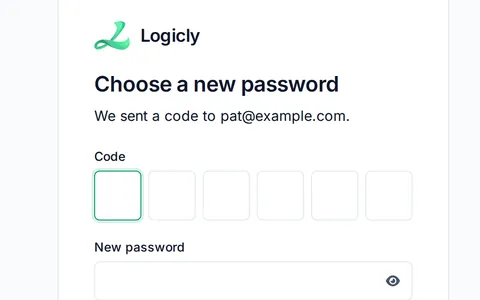
- Choose a new passwordYou asked to reset your password. The code is in the same kind of email from no-reply@logicly.ai.
- Enter your codeThis screen says to open your authenticator app. The code is not in an email. Open the authenticator app you set up for Logicly, such as Google Authenticator or Authy, and type the 6-digit code it shows for Logicly.
Lost your authenticator app?
Email support@logicly.ai and we will help you set it up again.
If the email isn't there
- Give it a minute or two.
- Look in your spam or junk folder, and in Promotions or Other if your email has those tabs.
- Search your email for no-reply@logicly.ai or for Logicly verification code.
- Check the address on the screen. It says We sent a code to, then your email. For your privacy, Logicly shows the same screen whether or not an account uses that address, so a typo looks the same as a code on its way. If it is wrong, go back and type it again.
- If you use a work email, ask your IT team to let mail from logicly.ai through.
- Add no-reply@logicly.ai to your contacts, so future codes reach your inbox.
Ask for a new code
- On Check your email, tap Send a new code.
- On Choose a new password, tap Back to sign in, then Forgot your password? again, and enter your email.
- Use the code from the newest email.
If no email comes at all, write to support@logicly.ai from the address you use for Logicly. If an email to your address bounced before, for example when the mailbox was full, we may need to clear it on our side.
Reset a forgotten password
- On Sign in, tap Forgot your password?
- Enter your email and tap Send code.
- Open the email from no-reply@logicly.ai.
- On Choose a new password, type the code and a new password.
- Tap Change password. Logicly signs you in.
Your new password needs 12 or more characters, a lowercase letter, an uppercase letter, a number and a symbol. Each rule gets a check mark as you type.
If you never confirmed your email, Forgot password still works. Your first code confirms your email. Logicly then says Your email is confirmed. We sent you one more code. Enter it to finish. Use the second code to set your password.
What the messages mean
- That code is not right. Try again.Check the digits. If you asked for more than one code, use the newest.
- That code has expired. Ask for a new one.Ask for a new code as shown above.
- Too many tries. Try again in a few minutes.Wait a few minutes before you try again or ask for another code.
- That password does not meet the rules.Check the list under the password. Every rule needs a check mark.
- That took too long. Sign in again.Start again from Sign in.
- That code was already used. Enter the next one.On Enter your code, wait for your authenticator app to show a new code, then type it.
- Incorrect email or password.Check your email address, or tap Forgot your password?
- Logicly could not reach sign-in. Try again.Check your Wi-Fi or cell signal, then try again.
Related articles
Sign in with Face ID or a fingerprint, and why Logicly locksSign in with a glance, and open Logicly again after it locks.Add Logicly to your phone's home screenGive Logicly its own icon, so it opens full screen like an app.Send feedback or report a problemSend us a picture of the screen with every patient detail blanked out.