Where to find it
- On a phoneTap More at the bottom of the screen, then Feedback.
- On a computer or tabletClick Feedback in the menu on the left, under the line below Tools.
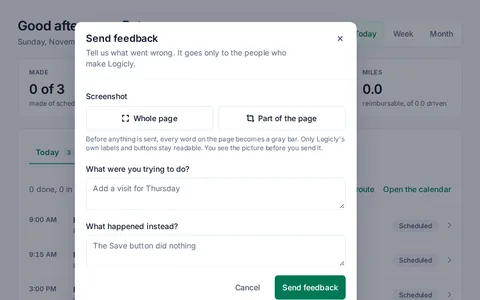
Send it
- Tap Feedback. Send feedback opens.
- Under Screenshot, tap Whole page, or Part of the page. For part of the page, drag over the part you want to send.
- Look at the picture. Every word on the page is now a gray bar. Only Logicly's own labels and buttons stay readable. This is exactly the picture we get.
- To change it, tap Retake whole page, Select another area, or Remove.
- Fill in What were you trying to do?, What happened instead?, or both. One box is enough.
- Tap Send feedback.
Keep patient details out
Do not write patient names or details in the boxes. The picture blanks them for you, but the boxes send what you type.
What happens after you send
Logicly says Feedback sent and gives you a reference. If you write to us about it at support@logicly.ai, give that reference, so we find your picture.
Your feedback goes only to the people who make Logicly. It also sends the screen's name, the window size and your browser. Nothing is kept on your phone.
If it isn't working
- The screenshot could not be taken here.You can still send your feedback without it.
- Say what you were trying to do, or what happened instead.Both boxes are empty. Write a few words in one of them.
- Your feedback could not be sent. Try again.Check your signal and tap Send feedback again. What you typed stays in the boxes while the window is open.
- You have sent a lot of feedback in the last hour. Try again later.You can send 10 in an hour. Wait a while, or email support@logicly.ai.
Each box holds up to 2,000 characters. A counter shows when you get close.
Related articles
My sign-in code didn't arrive, or I forgot my passwordFind your code, ask for a new one, or choose a new password.Use Logicly with no signalSee your schedule and patients in a dead zone, as of the last refresh.Your free month and paying for LogiclyYour first month is free. Then it is $24 a month, and you choose when to pay.