Your free month
Your first month of Logicly is free, with the whole app and your own caseload. No card is needed until you choose to keep it. Logicly emails you when your free month starts, and again before it ends.
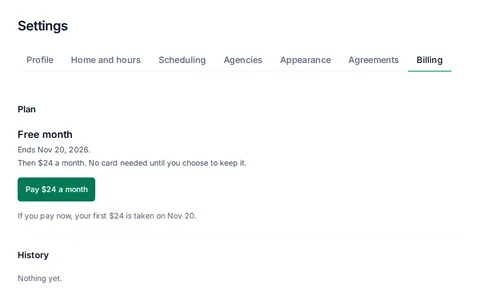
See when it ends in Settings, then Billing. On a phone, tap More, then Settings, then Billing. In the last 7 days, a bar named Your plan also says Your free month ends, with the date. You can close the bar for the day.
After the free month, Logicly is $24 a month for the Clinician plan.
Pay or update your card
- Open Settings, then Billing.
- Tap Pay $24 a month.
- Enter your card on Stripe's secure payment page.
- Back in Logicly, it says Payment received. Setting up your plan. After a moment it says Clinician plan, $24 a month, with your next payment date and card.
Paying early does not cost you free days. Billing says If you pay now, your first $24 is taken on, then the day your free month ends.
To change your card or see receipts, tap Manage card and receipts. It opens Stripe's billing page. Stripe also emails a receipt for each payment. Your payments, failed payments and refunds are listed under History.
Declined cards, read only, and canceling
- Your card was declinedThe bar says Your card was declined. Update it by, then a date. Logicly stays open until then. Tap Update card and enter a card that works.
- Read onlyWhen your free month ends without a payment, your card is not updated in time, or your plan ends, Logicly becomes read only. You can see everything, but not change it. Your patients and visits are all still here. Nothing is deleted.
- A button shows a lockLogicly is read only. Tapping it says Logicly is read only right now. Pay $24 a month to make changes again. Tap Pay $24 a month, or Not now. Once the payment goes through, Logicly opens again, as you left it.
- CancelIn Settings, Billing, tap Cancel plan, then Cancel plan again to confirm. Logicly stays open until the end of the month you paid for, and you are not charged again. After that it is read only. Nothing is deleted.
- Changed your mindBefore your plan ends, tap Keep my plan in Settings, Billing. Your plan goes on as before.
During the free month there is nothing to cancel. If you do not pay, Logicly becomes read only when the month ends, and you are never charged.
If it isn't working
- Setting up your plan stays on the screenYour payment was received and Logicly is finishing your plan. Give it a minute, then reload the page.
- Nothing changed. Check your connection and try again.Logicly could not reach the internet. Try again when you have signal.
- Your billing could not be loaded. Reload the page to try again.Reload the page. If it keeps happening, write to support@logicly.ai.
- You want a refundThere is no refund button in Logicly. Write to support@logicly.ai.
- There is no Billing in SettingsSome accounts have no billing. If yours should, write to support@logicly.ai.
Related articles
Send feedback or report a problemSend us a picture of the screen with every patient detail blanked out.My sign-in code didn't arrive, or I forgot my passwordFind your code, ask for a new one, or choose a new password.Add Logicly to your phone's home screenGive Logicly its own icon, so it opens full screen like an app.