Home Health Caseload Management
Everything about a patient, before you knock.
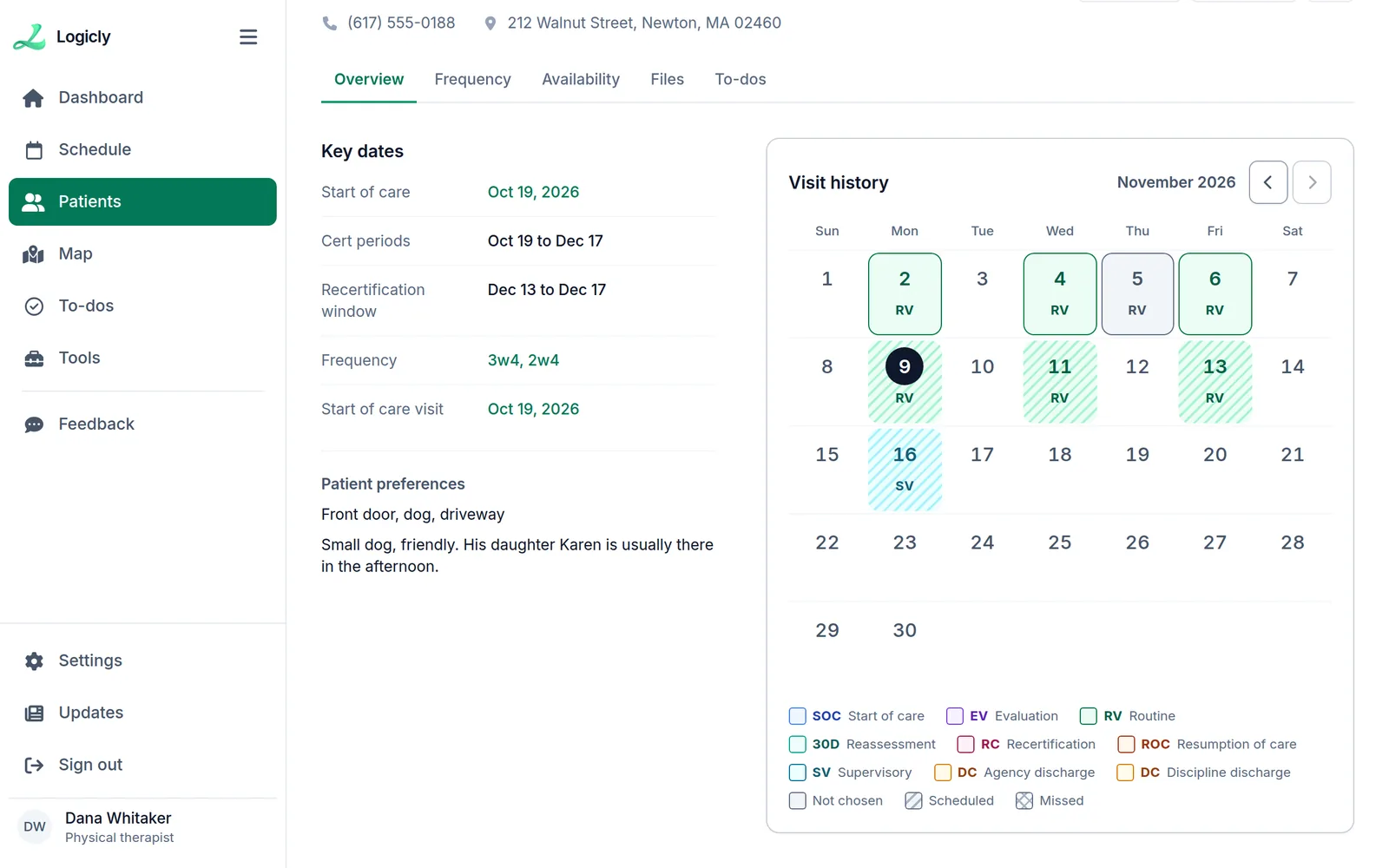
Logicly’s patient record keeps what a home health clinician needs about each patient in one place: the agency, phone and address, the start of care, cert period and recertification window, the frequency, precautions such as oxygen in use or infection precautions, the times the patient can’t be seen, and the to-dos for that patient.
1-month free trial · No card to start · HIPAA compliant
What is home health caseload management?
The patient record replaces the notes app, the sticky notes and the paper face sheet. The Overview shows the key dates, the patient’s preferences and how to get in. The Frequency tab holds the cert periods and the order. The Availability tab holds the times the patient can’t be seen, such as dialysis days. Precautions sit where you see them before a visit, and the To-dos tab lists what you still have to do for that patient.
How does home health caseload management work?
- 1
Add your caseload
Add a patient by hand, or upload your caseload from a spreadsheet with the template Logicly gives you.
- 2
Keep the dates
Enter the start of care, and Logicly works out each 60-day cert period and the recertification window. The dashboard shows what is due.
- 3
Mark what matters at the door
Record precautions such as infection precautions, oxygen in use, weapons or smoking in the home, hoarding, pets and falls at home. A visit’s window on the Schedule page shows them beside the address.
- 4
Keep a to-do list
Add to-dos for a patient, for scheduling or for yourself, with a date and a time if it needs one, steps, and a picture if it helps. Tick one off, and Undo is there if you ticked the wrong one.
Who is this for?
Field clinicians
Open a patient between visits and find the dates, the door code or the precautions in seconds.
Clinicians who see patients for several agencies
Each patient shows the agency they belong to, so you know whose patient it is and which system to chart in.
How much time does home health caseload management save?
The time goes to looking things up: which agency, when the recert window opens, whether this is the patient with dialysis on Tuesdays. With it all on the record, the answer is one tap away, and the to-dos you used to keep in your head are on a list.
Is home health caseload management HIPAA compliant?
Yes. Everything is encrypted where it is stored and while it travels, and every change to a patient or a visit is kept in an audit trail. Logicly signs you out after 15 minutes without activity, or locks if you use Face ID, and you sign a Business Associate Agreement in the app before you add a patient. It is part of the plan, at no extra cost.
Frequently asked questions
- Is this an EMR? Can I write visit notes in it?
- No. Logicly is your schedule, routes and caseload. You keep charting in your agency’s EMR, and each patient shows which agency that is.
- How do I get my patients in?
- Add them one at a time, or download Logicly’s template, fill it in, and upload your caseload in one go.
- What can I put on a to-do?
- A title, notes, a date and a time if it needs one, the patient it is for, a list of steps, and pictures. Tag it Patient, Scheduling or Personal, and filter the To-dos page by tag. A patient’s To-dos tab shows only that patient’s.
- Can I see a patient’s visit history?
- Yes. The Overview has a Visit history calendar that shows each visit’s day and type, in the colors you choose for the visit types.
Related features
Your team deserves better than a spreadsheet.
Start your one-month free trial today. No card is needed to start. Set up takes less than 10 minutes — and your first auto-generated schedule will make you wonder why you waited.
Free for a month — $24/month after that. No contracts. Cancel anytime.
Reviewed by Reza, OTR/L — practicing Occupational Therapist and co-founder of Logicly.Last updated .