Home Health Scheduling on Your Phone
Your schedule in your pocket, open with a glance.
Logicly works on a home health clinician’s phone as well as a computer. Add it to your home screen and it opens full screen with its own icon. Sign in with Face ID or a fingerprint, keep the controls near your thumb, turn the phone sideways for a wider view, and make the text Larger or Largest.
1-month free trial · No card to start · HIPAA compliant
What is home health scheduling on your phone?
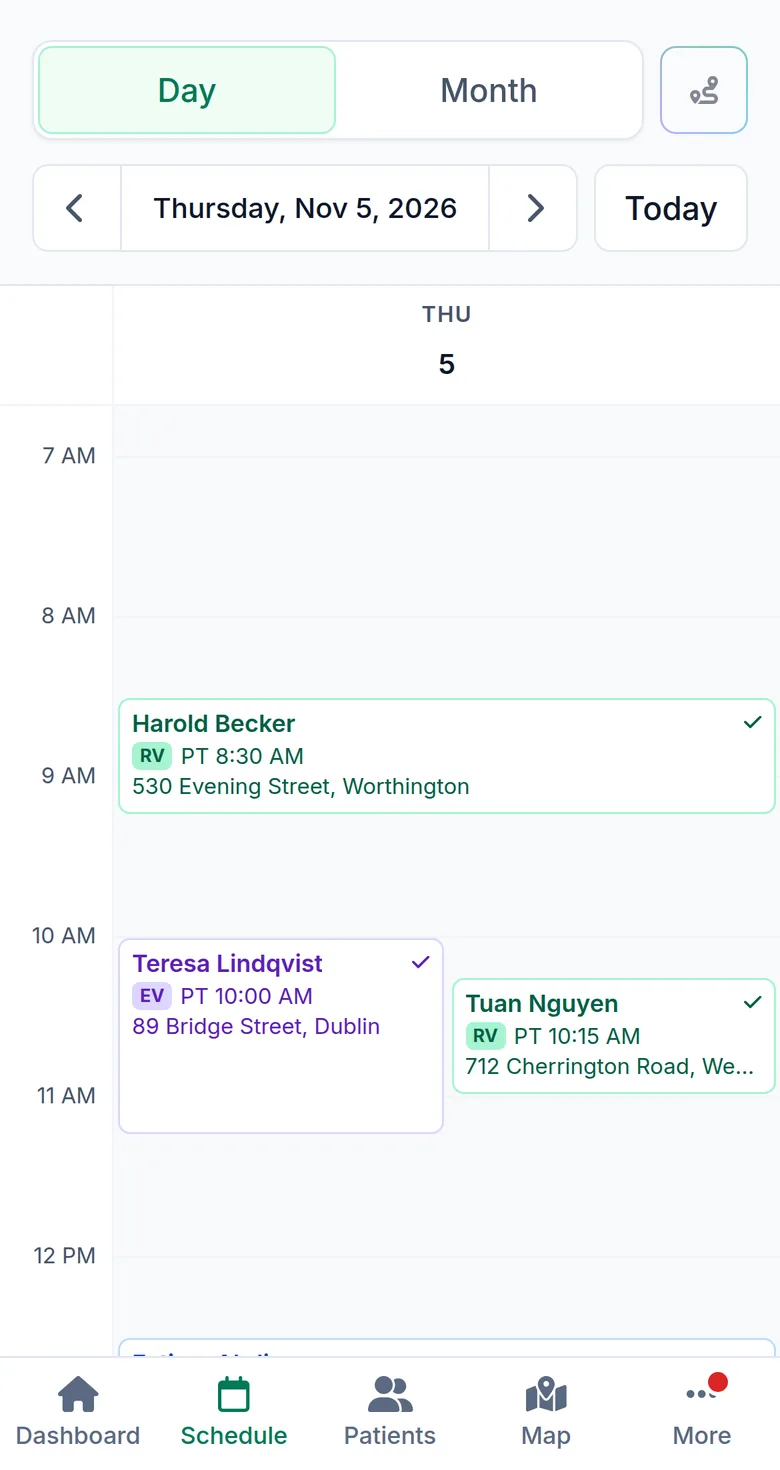
Logicly is one app for the phone in your car and the computer at home. On a phone, the bottom bar holds Dashboard, Schedule, Patients, Map and To-dos, and More holds the rest. Every screen also has a layout for a phone held on its side, with the menu as a strip down the left. In Settings, Appearance you choose light, dark or your phone’s setting, and a text size of Default, Larger or Largest that grows the whole app.
How does home health scheduling on your phone work?
- 1
Add it to your home screen
Open app.logicly.ai on your phone and add it to your home screen. Tap the icon between visits, and it opens full screen, like an app.
- 2
Turn on Face ID
In Settings, Security, set up Face ID or a fingerprint on this phone. Logicly locks after 15 minutes without activity and opens again with a glance.
- 3
Work one-handed
On the Schedule page, the day arrows, Today, and Day or Month sit right above your visits. Optimize route is the icon beside them.
- 4
Make it yours
Choose a text size and a theme in Settings, Appearance. Turn the phone sideways when you want to see more of the day.
Who is this for?
Clinicians on the road
Check the next address, call the patient or move a visit from the car, without a laptop.
Anyone who wants larger text
Larger and Largest grow every screen, not only the words, so nothing is cut off.
How much time does home health scheduling on your phone save?
Between visits you have a minute or two. With Logicly on the home screen and Face ID, opening your schedule is one tap and a glance, with no password to type.
Is home health scheduling on your phone HIPAA compliant?
Yes. Face ID and fingerprints never leave your phone: Logicly gets only a yes from it. Without Face ID, the app signs you out after 15 minutes without activity. Everything is encrypted where it is stored and while it travels, every change to a patient or visit is in an audit trail, and you sign a Business Associate Agreement in the app before you add a patient.
Frequently asked questions
- Do I download it from the App Store?
- No. Open app.logicly.ai in your phone’s browser and add it to your home screen. It gets its own icon and opens full screen, and it is always the latest version.
- Which phones work with Face ID sign-in?
- Phones with Face ID or a fingerprint reader. If yours has neither, sign in with your password and an authenticator app.
- Can I use it on a tablet or a computer too?
- Yes. It is the same account everywhere, and the screens fit a phone, a tablet or a computer.
- Is there a dark mode?
- Yes. In Settings, Appearance, choose Light, Dark or Match my device.
Your team deserves better than a spreadsheet.
Start your one-month free trial today. No card is needed to start. Set up takes less than 10 minutes — and your first auto-generated schedule will make you wonder why you waited.
Free for a month — $24/month after that. No contracts. Cancel anytime.
Reviewed by Reza, OTR/L — practicing Occupational Therapist and co-founder of Logicly.Last updated .