Find the tools
Tools is in the menu, under Map. On a phone, press More, then Tools.
- Type in Search tools to find a tool by name or by what it does. You can also type an order like 3W2, and Logicly offers Open in Frequency Calculator with the weeks worked out.
- Under the search are examples to try, the tools you used most recently, and every group of tools.
- On a tool's page, press All tools to go back, or search again from the bar. On a wide screen, the list of tools stays beside the page.
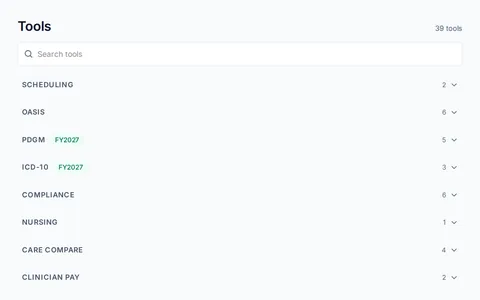
What is there
- SchedulingFrequency Calculator and Discipline Scope Checker.
- OASISOASIS Schedule Calculator, OASIS RFA Picker, OASIS Item Lookup, CMS OASIS Q&A Lookup, OASIS Edit Code Lookup and OASIS-E2 Submission Validator.
- PDGMPDGM Coding Console, HIPPS Code Decoder, PDGM Clinical Groups, Functional Level Calculator and LUPA Threshold Checker.
- ICD-10Primary Diagnosis Eligibility, Not Acceptable as Primary and ICD-10-CM Chapter Reference.
- ComplianceConditions of Participation Lookup, Rule Tracker, Compliance Calendar, EVV Readiness Checker and HIPAA Checklist. Ordering Doctor Check opens homehealthscheduling.com in a new tab.
- NursingWound Measure.
- Care CompareDoes My Parent Qualify?, Find a Home Health Agency, Agency Directory and Questions to Ask an Agency.
- Clinician payClinician Pay Calculator and Licensure Compact Map.
- HandoutsHome Exercise Program Builder and Exercise Library open HEP Hub. OT Handouts, Balance Program Builder, Walking Log, Getting Up After a Fall and Mobility Instruction Sheets are marked Coming soon.
- Market reportsHome Health Markets by County, Agency Market Report and Sample Report open homehealthscheduling.com in a new tab.
Save a home exercise program with HEP Hub
HEP Hub builds home exercise programs inside Logicly. It is for PTs, PTAs, OTs and OTAs.
Turn HEP Hub on
- Open Settings, then Integrations.
- Turn on the HEP Hub switch. Turning it on shares your name and email with HEP Hub. No patient information leaves Logicly.
- HEP Hub now shows in the menu, just above Tools. On a phone, it is under More.
Save a program to a patient
- Open HEP Hub from the menu and build the program.
- Press Save to Logicly in HEP Hub. The Save to a patient window opens.
- Find the patient with Search by name, and choose them.
- Press Save. Logicly says Saved to, then the patient's name, then files.
- Press Open Exercise program to see it in the patient's Files, in the Exercise program folder, or press Done.
The file is named after the program and the date, such as Home exercise program 2026-11-07.pdf. If you press Cancel, nothing is saved to the patient.
If it isn't working
- I can't find Integrations or HEP HubHEP Hub is offered only when your profile's discipline is PT, PTA, OT or OTA. Integrations shows in Settings only when it has something for you.
- HEP Hub is off.Press Open Settings and turn HEP Hub on.
- HEP Hub is for PT, PTA, OT and OTA.Your profile lists another discipline. If your discipline is wrong, write to support@logicly.ai.
- HEP Hub is not available.The rest of Logicly works as usual. Try again later. If it says Sign out and in again, then try HEP Hub., do that.
- HEP Hub did not load.Press Try again in a moment.
- You have no active patients.The program can only be saved to an active patient. Add or find the patient first.
- No patients match your search.Check the spelling, or clear the search.
- Logicly is read only right now.Pay $24 a month to make changes again. Billing in Settings has the details.
- A tool says This tool is coming to Logicly.That tool is not ready yet.