Optimize route & map
A better driving order before you leave home.
On Schedule's Day view, Optimize route puts the day's visits in a better driving order. The Map page shows the day's route and the rest of your caseload, so you can see who lives near whom.
Free for 14 days, then $24 a month.
What is route optimization for home health?
Route optimization finds the visit order with the least driving for one day. Logicly works from your home address, your working hours and each patient's address. It never moves a visit to another day, and a locked visit keeps its time while the others fit around it. If the day cannot fit in your working hours, nothing moves and Logicly says why.
See what moves first
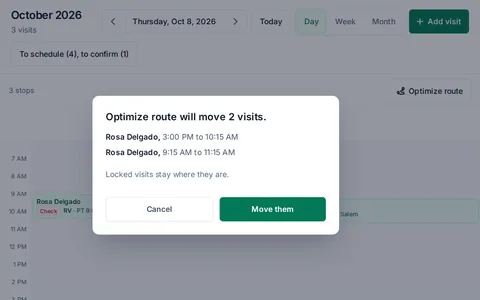
Logicly lists each visit it would move, with the old and new time. Nothing changes until you press Move them.
Locked visits stay put
Lock the time of a visit the patient is counting on, and Optimize route works around it.
On your phone too
On a phone, Optimize route is the icon beside Day and Month, near your thumb.
How to optimize a day's route
- 1Open the daySwitch Schedule to Day view. The route sits beside the calendar with the drive between visits.
- 2Press Optimize routeRead the list of visits that would move, each with its old and new time. Press Move them or Cancel.
- 3See it on the mapMap shows the stops in order, each leg's minutes and miles, and when to leave home. Switch to Caseload to see where every patient lives.
- 4Change your mindUndo puts the times back. You can also drag a stop in the Map page's list to set the order yourself.
You no longer work out the order by hand.
How much time does it save?
Ordering a day by hand means guessing who lives near whom. Optimize route uses the drive between each pair of addresses, so the guess goes away.
Who is this for?
Anyone who drives between patients
See the day in order before you leave the house.
Clinicians paid for mileage
Each day's miles are counted, and Mileage totals the month.
Questions about Optimize route & map
Is it HIPAA compliant?
Yes. Patient information is encrypted in storage and in transit, and Logicly keeps an audit trail of every change to a patient or a visit. The app signs you out after 15 minutes idle, or locks if Face ID is on. You sign a BAA in the app before you add a patient, and it is part of the plan.
Does Optimize route move visits without asking?
No. It lists each visit it would move, with the old and new time. Nothing changes until you press Move them.
Can I keep a visit at a set time?
Yes. Lock the time of a visit and Optimize route works around it.
What does the map show?
The day's route and the rest of your caseload, so you can see which patients live near each other.
Does it move visits to another day?
No. It changes only the order and times of the day you are looking at. Auto-schedule week is what spreads visits across the week.
Does it give turn-by-turn directions?
No. Logicly plans the order and draws the route. The Map button on a patient opens their address in your maps app for directions.
How much does Logicly cost?
Logicly is free for 14 days, then $24 a month.