Auto-schedule week
Your week placed for you, in driving order.
Press Auto-schedule week in the visit pool before the week starts. Logicly spreads the week's visits across your work days and orders each day by the drive. Undo puts the week back.
Free for 14 days, then $24 a month.
What is auto-scheduling for home health?
Auto-scheduling turns a frequency order into visits on a calendar. In Logicly, the visits a week still needs sit in the visit pool on Schedule. One press places them all: a patient's visits land a day or two apart, at times that fit, and every day is ordered by the drive. You can still tap the days yourself, drag one visit at a time, or move anything afterwards.
Pick the days yourself
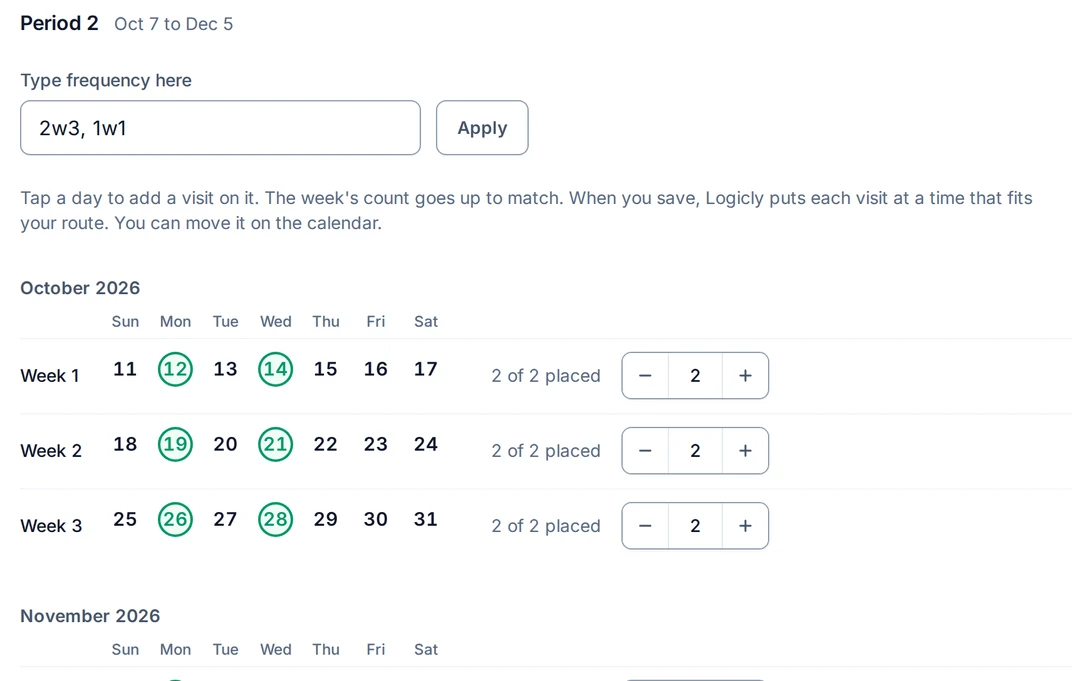
Tap Monday and Wednesday each week for 2w8 on the Frequency tab. Logicly picks a time that fits your route.
Drag to change it
Plans change. Drag a visit to another day, or drop it back on the visit pool and it waits there to place again.
Blocked times stay clear
Mark dialysis days and other times a patient can't be seen. You see them while you drag a visit, before you drop it.
How to auto-schedule your week
- 1Type the frequencyOn the patient's Frequency tab, enter the order as it is written, like 2w3, 1w1. The 60-day cert period is already set from the start of care.
- 2Pick days, or leave them openTap Monday and Wednesday and those visits go on the schedule. Leave the days open and the visits wait in the visit pool.
- 3Press Auto-schedule weekLogicly places what is still in the pool. Visits already on the calendar, visits you have finished and your days off stay as they are.
- 4Check it, or undo itDrag anything you want to change. Undo puts the whole week back.
You no longer place each visit by hand.
How much time does it save?
Planning by hand means reading each frequency, finding days that are not back to back and fitting the drive around them. Auto-schedule week does those three things at once. What remains is a check of the result and a few moves.
Who is this for?
Clinicians who plan their own visits
PTs, OTs, SLPs, nurses and assistants can plan the week in a few minutes instead of an evening.
PRN and per-visit clinicians
The visit pool lists every visit the week needs in one place, whichever agency the patient belongs to.
Questions about Auto-schedule week
Is it HIPAA compliant?
Yes. Patient information is encrypted in storage and in transit, and Logicly keeps an audit trail of every change to a patient or a visit. The app signs you out after 15 minutes idle, or locks if Face ID is on. You sign a BAA in the app before you add a patient, and it is part of the plan.
What does Auto-schedule week do?
It spreads the week's visits across your work days and orders each day by the drive, based on each patient's frequency.
Can I undo it?
Yes. Undo puts the week back. You can also drag any visit to another day, or drop it back on the visit pool.
Can I pick the days myself?
Yes. Tap the days for each week on the Frequency tab, and Logicly picks a time that fits your route.
How does it choose the day for a visit?
It spreads each patient's visits across your work days with a day or two between them, never on back-to-back days, then orders each day by the drive. A start of care keeps its day.
Does it move visits I already placed?
No. It only places visits still in the visit pool. Visits on the calendar, finished visits and days off are left alone.
How much does Logicly cost?
Logicly is free for 14 days, then $24 a month.