Patients & frequencies
Everything about a patient, easy to find.
Key dates, cert periods, frequencies, files and visit history sit on one page. Type a frequency as it is written, like 2w3, 1w1, and Logicly knows which visits each week needs.
Free for 14 days, then $24 a month.
What is caseload management for home health?
It is keeping what you need about each patient in one record instead of a notes app, sticky notes and a paper face sheet. In Logicly, Overview has the key dates, preferences and how to get in. Frequency has the cert periods and the order. Availability has the times a patient cannot be seen, such as dialysis days. Precautions show before a visit, and To-dos lists what you still owe that patient.
Visit history at a glance
Each day in the history shows the visit type's color and short code, so you see a start of care, a routine visit or a missed visit without opening it.
Precautions before you knock
Infection, oxygen, weapons or hoarding notes show on the visit's window beside the map and the home details.
Holds and blocked times
Put visits on hold for a hospital stay, and mark the times a patient can never be seen.
How to set up a patient
- 1Add your caseloadAdd patients one at a time, or fill in Logicly's spreadsheet template and upload it.
- 2Enter the start of careLogicly works out each 60-day cert period and the recertification window, and the dashboard shows what is due.
- 3Mark what matters at the doorRecord infection precautions, oxygen, weapons, smoking, hoarding, pets or falls. They show on the visit's window beside the address.
- 4Keep a to-do listAdd a to-do for the patient with a date, steps or a photo, and check it off when it is done.
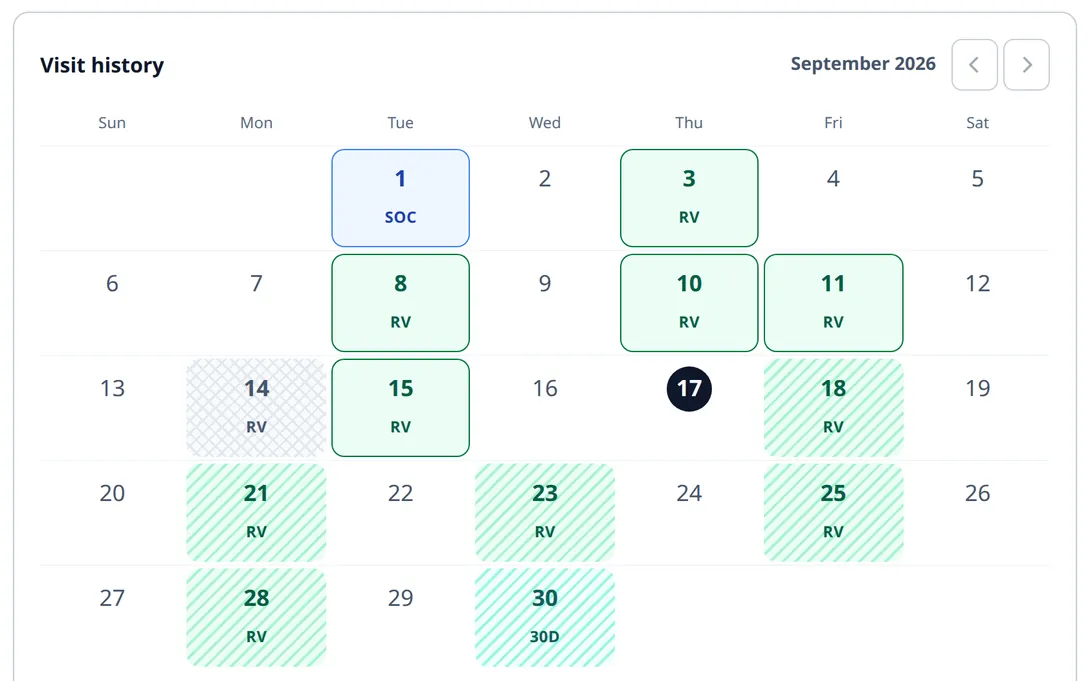
You no longer open each day to see what happened.
How much time does it save?
The time goes to looking things up: which agency, when the recert window opens, which patient has dialysis on Tuesdays. With those on one record, each answer is a tap away.
Who is this for?
Field clinicians
Find a date, a door code or a precaution in the minute between visits.
Clinicians with several agencies
Each patient shows its agency, so you know which system to chart in.
Questions about Patients & frequencies
Is it HIPAA compliant?
Yes. Patient information is encrypted in storage and in transit, and Logicly keeps an audit trail of every change to a patient or a visit. The app signs you out after 15 minutes idle, or locks if Face ID is on. You sign a BAA in the app before you add a patient, and it is part of the plan.
How do I enter a visit frequency?
Type it as it is written, like 2w3, 1w1. Logicly knows which visits each week needs.
Can I import my caseload?
Yes. You can import your patients from a sheet.
Can I pause visits for a hospital stay?
Yes. Put the patient's visits on hold, and mark any times they can never be seen.
Is Logicly an EMR?
No. Logicly is your schedule, routes and caseload. You keep charting in your agency's EMR, and each patient shows which agency that is.
Can I see a patient's visit history?
Yes. Overview has a visit history calendar showing each visit's day and type in your visit colors.
How much does Logicly cost?
Logicly is free for 14 days, then $24 a month.